Release Notes > 6.3.0
Webiny 6.3.0 Changelog
See what's new in Webiny version 6.3.0
 release on GitHub.
AI PowerUps
AI-Powered Page Content Generation (#5125,#5117,#5113,#5111)
Webiny now includes AI-powered content generation capabilities through the new AI PowerUps feature. You can configure AI providers (OpenAI, Anthropic) in the Admin settings, then use AI to generate page content directly within the Website Builder.
The feature includes:
- Provider configuration — set up connections to OpenAI or Anthropic with your API keys
- Content generation — generate page sections and content using natural language prompts
- Tool pipeline — AI-generated content is automatically processed through tools that convert text to Lexical editor format and resolve images
AI Image Enrichment for File Manager (#5123)
Images uploaded to the File Manager are now automatically enriched with AI-generated metadata:
- Tags — AI analyzes the image and assigns relevant tags for improved searchability
- Description — a human-readable description is generated and stored with the file
Both fields can be viewed and edited manually in the file details panel. This runs as a background task after upload, so it doesn’t block the upload process.
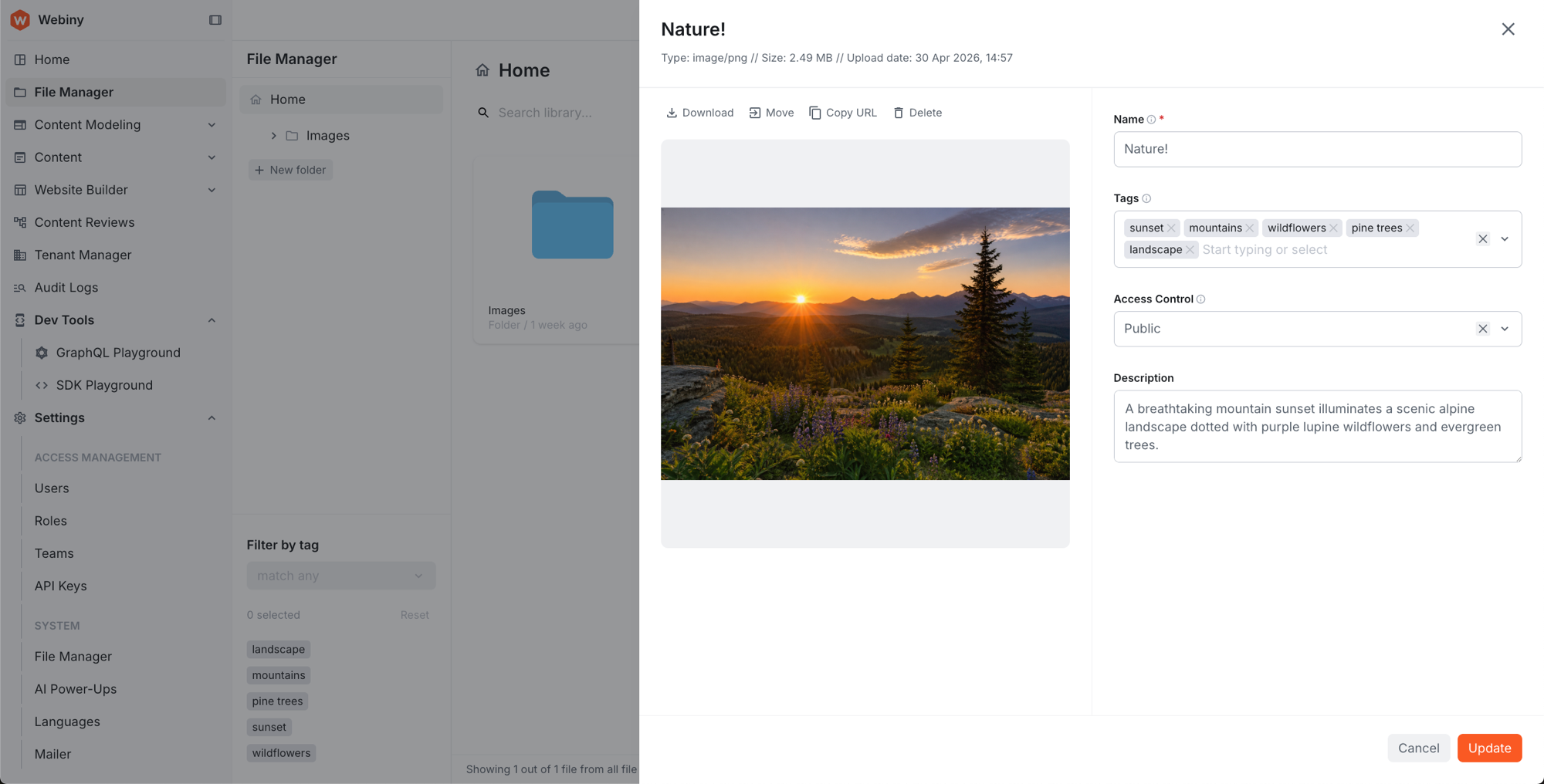 AI-generated tags and description in the File Manager file details panel
Admin
API Playground Renamed to GraphQL Playground (#5103)
The “API Playground” label in the admin interface has been renamed to “GraphQL Playground” for clarity.
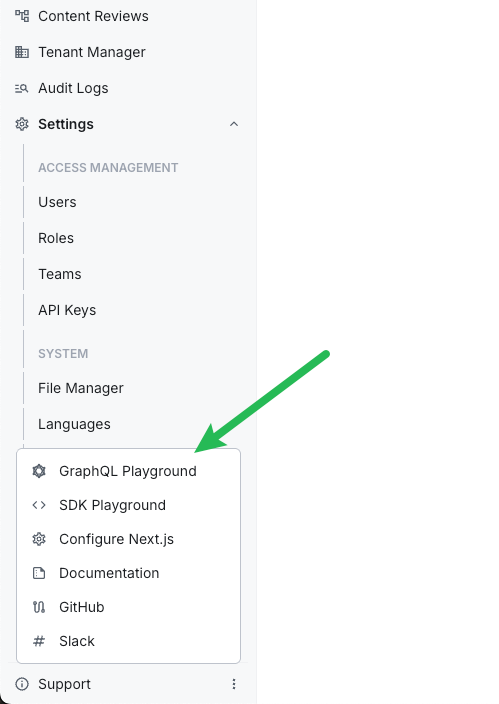 GraphQL Playground in the admin interface
Added Dev Tools Sidebar Section (#5130)
The GraphQL Playground and SDK Playground links have been moved from the Support dropdown menu into a new Dev Tools section in the sidebar. Access to each tool can now be managed through the Security permissions panel. The Support dropdown has been removed; the Upgrade link is now a standalone footer item, and Configure Next.js has moved into the Website Builder section.
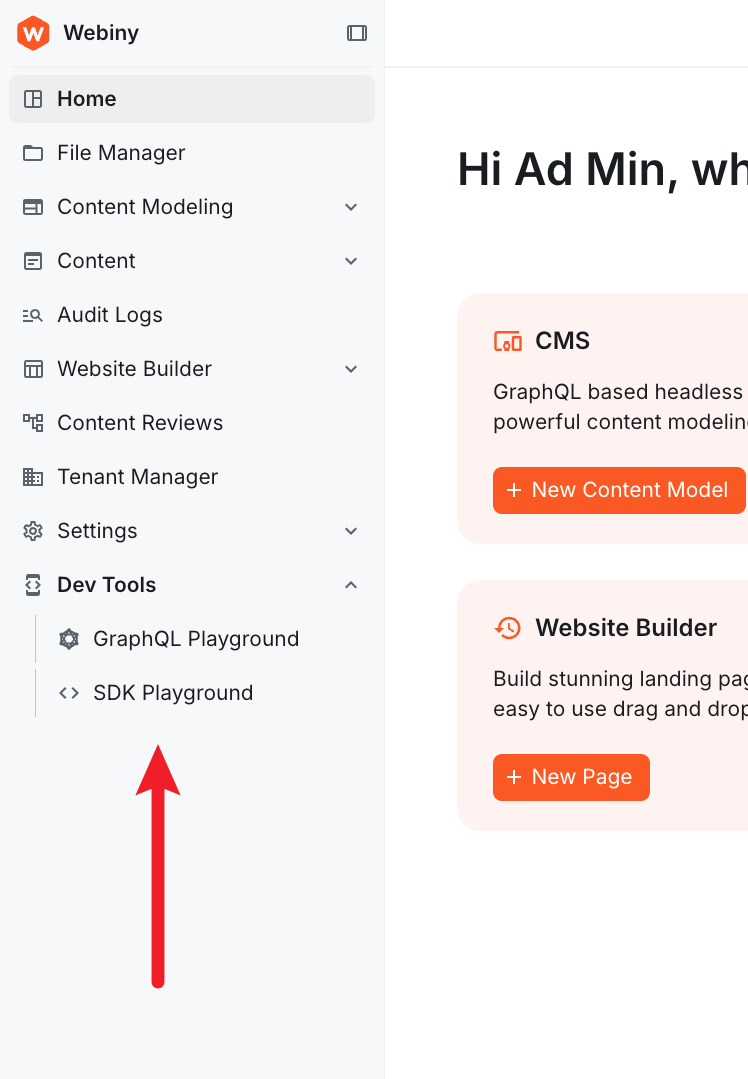 Dev Tools section in the admin sidebar
NewDatePickerComponent (#5149)
A new DatePicker component is now available, supporting multiple picker types via a discriminated union on the type prop: date, time, dateTimeLocal, dateTimeTz, week, month, year, dateRange, multipleDates, multipleMonths, and multipleYears.
Development
Typescript Upgraded to 6.0.3 (#5043)
Webiny now uses Typescript 6.0.3 with module resolution set to bundler. This brings improved type inference and better alignment with modern bundler toolchains.
Tenant Manager Use Cases and Features Now Exported From Public API (#5140)
The tenant manager’s use case classes, feature plugins, and TypeScript interfaces are now exported from webiny/api. This enables developers to extend or override tenant management behavior — including getting the current tenant, fetching by ID, creating, updating, enabling, disabling, and installing tenants.
Feature API Types Corrected (#5108)
The second parameter in the Feature API’s register method now correctly populates when defined via generics.
ExportuseBuildParamsFrom Main Admin Entry Point (#5136)
The useBuildParams hook was previously only importable from a sub-path (webiny/admin/build-params) and was missing from the main admin package exports. It is now available from the standard webiny/admin import path, consistent with all other admin hooks:
The sub-path export is now deprecated.
Upgrade Command Always Logs Full Output (#5126)
The webiny upgrade command now always outputs full logging information during execution, making it easier to diagnose upgrade issues.
Advanced Form Model for Declarative Admin UI Forms (#5138)
A new FormModel API is now available for building admin UI forms declaratively. This system powers internal Webiny forms and is available for extension developers building custom admin interfaces.
Key capabilities include:
- Layout primitives — tabs, rows, separators, and nested object nodes with per-template inner layouts
- Field types — text, number, boolean, datetime, object (with list mode, dynamic zones, and templates)
- Validation — required fields, Zod schema integration, async validation, conditional required rules, and form-level validation
- Field renderers — inputs, textareas, tags, switches, dropdowns, radio buttons, checkboxes, date/time pickers, object accordions, and dynamic zones
- Focus management —
form.focusField(path)walks the layout tree, activates ancestor tabs, and focuses the target field - Computed fields —
computed()andcomputedUntilDirty()for reactive derivation from other field values - Condition rules — hide or disable fields based on other field values
- List operations —
addItem/removeItemon field view models so renderers don’t manage array slicing directly - Type coercion —
parseValuehandles string-to-number, truthy-to-boolean conversions at the field builder level
Self-Cleaning Background Tasks (#5121)
Background tasks can now be configured to automatically delete themselves after completion. When enabled, the task runner removes the task record, all logs, child tasks, and their logs from the database once the task finishes successfully.
Enable self-cleaning in your task definition:
Mailer Configuration viawebiny.config.ts(#5114)
The Mailer package now supports configuration through webiny.config.ts instead of requiring plugin-based setup. Additionally, the replyTo, from, to, and bcc fields now accept the Name <email@example.com> format.
Fixed Tailwind CSS Build Leaking Filesystem Paths Into Production CSS (#5156)
The PostCSS build pipeline was embedding @source directives containing absolute filesystem paths into production CSS bundles. This occurred because Tailwind v4 only removes these directives from files it directly processes — pre-bundled CSS chunks (such as the Lexical editor styles) bypassed this cleanup, exposing the build machine’s directory structure in publicly-served assets.
A new PostCSS plugin now runs after @tailwindcss/postcss and strips any remaining @source at-rules from the final output, regardless of which files Tailwind processes directly.
Export Missing Dynamic Zone Field Renderer Components (#5153)
The Dynamic Zone field renderer components were not being exported from webiny/admin/cms/field-renderers, preventing their use in custom implementations. These components are now properly exported.
Newwebiny-mailer-smtpSkill (#5146)
A new AI skill has been added to help configure SMTP mailer settings. The webiny-mailer-smtp skill can write SMTP configuration directly into your webiny.config.tsx file when prompted.
Improved Content Models and Website Builder Skills (#5107)
The content-models skill now includes corrected renderer names (matching actual framework implementations like those in DataFieldBuilder.ts) and better documentation for list fields and layout nesting with object and dynamicZone fields.
The website-builder skill now documents the TypeScript prop types that input components receive at runtime. For example, file and image inputs receive an object with { id, name, src, width, height, mimeType, size } rather than a plain string.
Project Hygiene (#5154,#5142,#5128)
Yarn has been upgraded to 4.14.1. Third-party dependencies have been updated to their latest stable versions, reducing exposure to known vulnerabilities and picking up recent upstream improvements. Several packages had missing exports fields in their package.json files — these have been corrected, improving compatibility with modern bundler toolchains.
Upgrade Command Improvements (#5161)
The webiny upgrade command now supports a --force flag, allowing you to bypass certain checks when running upgrades. Additionally, debug output is now enabled by default during upgrade operations, making it easier to diagnose issues without additional configuration.
Storybook Upgraded to Version 10 (#5105)
The internal Storybook setup has been upgraded to the latest version (v10). This brings improved performance, better TypeScript support, and access to the latest Storybook features for component development and documentation.
Webiny SDK
Added Tasks SDK Module (#5106)
External applications can now interact with Webiny Background Tasks through the SDK. The new sdk.tasks module lets you list task definitions and runs, retrieve execution logs, trigger new tasks, and abort running tasks:
The SDK playground includes full TypeScript declarations for the new module, providing autocomplete and type checking.
Improved Input Validation and Error Reporting (#5120)
All SDK methods now validate inputs before making network requests and return descriptive errors for common mistakes:
- Type validation — Passing wrong types (e.g.
limit: "sd",search: false,fields: []) returns aValidationErrorimmediately - Field validation — Misspelled fields (
values.typo), object-type fields used as leaves (values.category), or unknown filter keys (tags_2in) return descriptive errors instead of silently returning empty results - Renamed error class —
GraphQLErrorhas been renamed toApiErrorsince the transport layer is an implementation detail - Typed
metaobject —CmsEntryDatanow includes a typedmetaobject withstatus,modelId,version,locked,title,description,image, anddatafields
Deployments
Old Pulumi Plugin Versions Now Cleaned Up (#5101)
Previously, downloading new Pulumi plugins would leave old versions behind, causing the .webiny/pulumi-cli folder to grow over time. Old plugin versions are now automatically removed when newer versions are installed.
Infra.Env.useEnvHook for Infrastructure Extensions (#5139)
The Infra.Env.useEnv hook is now available via webiny/extensions. It returns the deployment environment name passed via the --env CLI flag (e.g. webiny deploy --env prod), so extension authors no longer need to rely on process.env.STAGE or similar environment variables:
For more details, see Reading the Current Environment.
Added Encryption Service (#5109,#5112)
A built-in encryption service is now available in the Webiny API layer. Inject Encryption into any API feature to encrypt and decrypt strings using AES-256-GCM:
Configure the passphrase in webiny.config.tsx:
New projects already include this configuration. If you’re upgrading, add it to your webiny.config.tsx — your existing deployments won’t break, but deploying to a production environment without encryption configured will be blocked until it’s set up. For full details, see the Encryption article.
OpenSearch Domains Now Properly Prefixed (#5137)
OpenSearch domain names are now correctly prefixed with the configured Pulumi resource name prefix. Previously, the prefix was not applied to the domain name, causing a mismatch between the resource name and the actual AWS domain.
If you already have a deployed OpenSearch cluster, nothing will change — your domain will continue to operate without the prefix. If you want the prefix applied, you can redeploy; be aware this will recreate the domain and cause data loss. We intentionally did not apply the prefix automatically to existing clusters for this reason.
CorePulumi, ApiPulumi, and AdminPulumi Extensions Now Have Proper TypeScript Typing (#5150)
When implementing a custom Pulumi handler, the execute method’s app parameter previously had to be typed as any. It can now be typed using CorePulumi.Params (or ApiPulumi.Params / AdminPulumi.Params), giving full access to app resources, outputs, and environment with proper type checking.
This also fixes a longstanding bug in createAdminPulumiApp that was incorrectly casting to CorePulumiApp instead of AdminPulumiApp.
Fixed Duplicate Pulumi Resource URN Error When Registering Multiple API Routes (#5135)
Deploying two or more Api.Route extensions at the same time caused a “Duplicate resource URN” error during pulumi up, preventing the deployment from completing. Multiple API routes can now be registered and deployed without conflict.
New Documentation
This release adds the following new developer documentation:
API
- Add Custom API Routes — register custom HTTP endpoints on the Webiny API using the
Api.Routeextension - Build-Time Parameters — access build-time configuration in your API extensions
- Encryption — inject and use the
Encryptionservice to encrypt/decrypt values in API extensions
Admin
- Build-Time Parameters — access build-time configuration in Admin extensions
- Form Model Reference — API reference for the declarative Form Model system
Website Builder
- Page Settings — customise and extend Page Settings with the FormModel architecture
Deployments and Infrastructure
- DynamoDB-Only Dev Environments — run Webiny locally without OpenSearch
- Shared OpenSearch Cluster — configure a shared OpenSearch cluster across environments
- Encryption — configure the encryption passphrase in
webiny.config.tsx
Reference
- Api Extensions, Admin Extensions, Infra Extensions, Cli Extensions, Project Extensions — full reference for all
webiny/extensionscomponents - Tasks SDK — full reference for the
sdk.tasksmodule
Website Builder
Page Settings Rebuilt With FormModel Architecture (#5148)
The Page Settings panel has been completely rewritten using the new FormModel architecture, replacing the previous react-properties-based implementation. This brings a cleaner presenter-driven design where each settings group (General, SEO, Social, Schema) is a self-contained class that defines its fields, layout, and data mapping.
New extension points allow you to customise Page Settings without modifying core code:
PageSettingsGroup— add entirely new settings tabsPageSettingsGroupModifier— inject fields into existing groups
The layout builder now supports positional helpers (before/after) for precise field placement within groups.
Headless CMS
Model Field Compression (#5145)
Large CMS models with many fields can hit storage limits or slow down model loading. You can now enable field compression to reduce the stored size of model definitions.
To enable compression, add the following to your webiny.config.ts:
This is primarily useful for testing scenarios or projects with unusually complex models.
Hidden Built-in Models (#5099)
Built-in system models (Languages and Tenants) are now hidden from the Admin UI by default. These models are tagged with $hidden:true and no longer appear in the content model list, reducing clutter for content editors.
Refactored Entry Filtering System (#5086,#5089)
The internal filtering system for CMS entries has been refactored for better maintainability and extensibility. The previous plugin-based approach (CmsEntryFilterPlugin and ValueFilterPlugin) has been replaced with a cleaner abstraction pattern using a filter registry. This change is internal and does not affect the public API, but it lays the groundwork for more flexible filtering capabilities in future releases.